Billing
This Billing FAQ answers common questions about your PlayCanvas subscription. For a summary of what each plan includes, see the pricing page; to learn how team accounts work, see Organizations.
Plans and eligibility
Can businesses sign up to the Personal plan?
Yes, providing the annual revenue of that business is below $100,000. Otherwise, the Organization plan should be selected.
We don't verify company revenues, so there's an element of trust involved. We rely on our users to support the ongoing development of PlayCanvas by choosing the plan that best matches their circumstances. Thanks for helping us keep PlayCanvas sustainable!
Can I switch between the Personal and Organization plans?
No, there's no in-app switch between the two plans. To move from the Personal plan to the Organization plan — or the other way around — cancel your current plan and then sign up to the other one.
The Organization plan applies to an Organization, which is a separate account type, so Creating Organizations covers how to set one up and bring your existing projects across.
Do you offer education or startup discounts?
We don't have a formal education discount, but if you'd like to use PlayCanvas for teaching or study, email us at sales@playcanvas.com with a proposal. We don't offer discounts for startups.
Payments and renewals
Does my subscription auto-renew?
Yes. Once you subscribe to the Personal or Organization plan, payment will automatically be taken on a monthly basis, on the day of the month when you first subscribed.
What payment methods and currency do you accept?
PlayCanvas subscriptions are billed in US dollars (USD). Payment is by debit or credit card only — we don't support other methods such as PayPal or bank transfer.
Can I pay in advance for my subscription?
Yes, but only for Organization plan subscriptions with a minimum term of 1 year. If you'd like to pay in advance for an Organization plan, please contact us at billing@playcanvas.com with the following information:
- Number of Organization seats required
- Term of the upgrade
- Business name
- Business address
- Contact name
- Contact email
- VAT number (if applicable)
We will generate an online invoice that can be settled by debit or credit card. Once payment is received, we'll provide you with an account upgrade code that you can apply on the upgrade page.
Personal plan subscriptions are only available as monthly auto-renewing subscriptions.
What happens if a payment fails?
If a renewal payment fails, it's automatically retried up to 4 times over about three weeks. If the payment still can't be collected after the final attempt, the subscription is cancelled and your account returns to the Free plan, which locks any private projects until you resubscribe.
Invoices
How do I receive invoices?
Invoices for monthly subscriptions are emailed to the owner of the subscribed account on the monthly billing date. The subject line for these emails begins with "Your receipt from PlayCanvas Ltd".
If invoices are not reaching your inbox, please check your spam folder.
Where can I find my billing history?
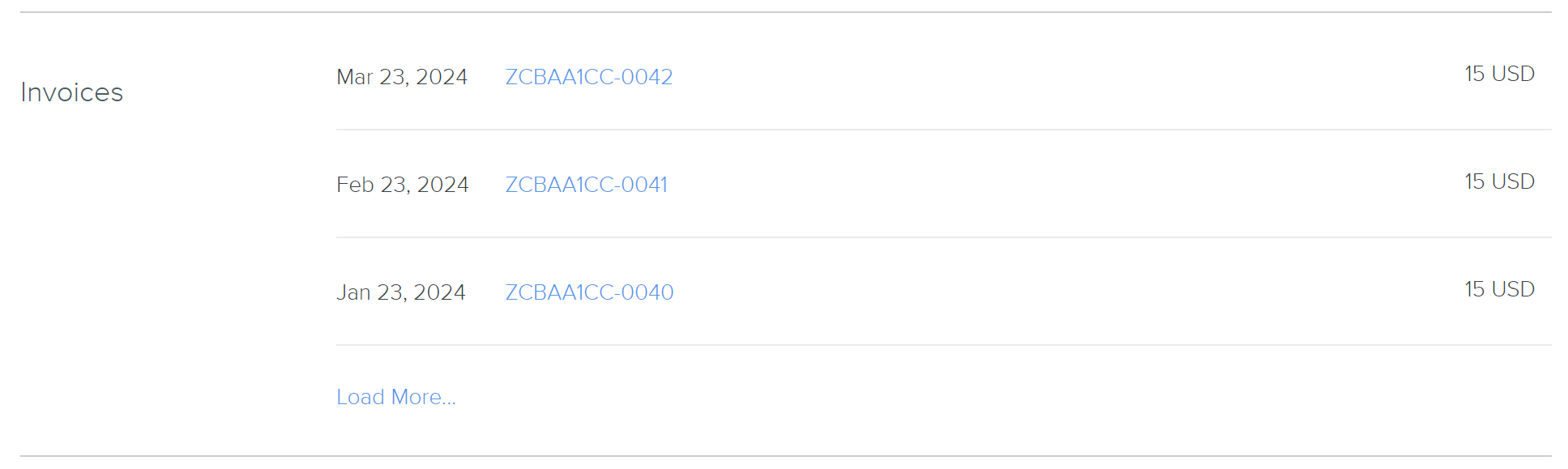
Your historical invoices are available to download on playcanvas.com. Visit your account page and scroll to the Invoices section. You should see something similar to this:
How do I update my details on my invoices?
You may want to edit certain details that appear on your invoices, such as:
- Billing Name
- Billing Address
- Tax ID
To do this, visit the account page for your subscribed account (remembering that Organizations have their own account page). Navigate to the Billing Info section and click Edit. Fill out the payment details form and click UPDATE CARD.
Organization billing
How is billing for Organization accounts calculated?
In short, you're billed for your current number of seats each month (at $50 per seat), with a pro-rata adjustment on your next billing date for any seats you added or removed during the previous month.
The day you subscribe to an Organization account is your monthly billing date. So if you subscribe on 10th July, you will be billed on that date with subsequent billing dates as 10th August, 10th September and so on.
The Organization plan allows you to add and remove seats at any time. When seats are added or removed, it is important to understand that this will increase or decrease the cost of your plan. However, this change in cost is not accounted for immediately when the number of seats is changed. Instead, it is accounted for at the next billing date.
Example
Imagine the following sequence of events:
- A user signs up for a 1-seat Organization plan on 10th May.
- The user then adds 1 seat on 20th June.
- The user removes 1 seat on 20th August.
The billing events from May to October will be as follows:
- 10th May: $50
- 10th June: $50. The plan has 1 seat and no changes were made to the plan in the previous month.
- 10th July: $100 + $50 x 20/30 = $133.33. The user has two seats on this billing date so is charged 2 x $50 for the upcoming month. One of these seats was added on 20th June and the use of that seat between 20th June and 10th July must now be accounted for. Since this period is 20 days of the 30 days between the two billing dates, $50 x 20/30 is added to the bill. In other words, seats that are added or removed are accounted for ‘pro-rata’ on the next billing date.
- 10th August: $100. The plan has 2 seats and no changes were made to the plan in the previous month.
- 10th September: $50 - $50 x 21/31 = $16.13. The users has one seat on this billing date so is charged $50 for the upcoming month. A seat was removed on 20th August so it was only used for 10 of the 31 days between billing dates. Since the user paid $50 for that seat on the previous billing date, they are due a refund for the unused 21 days. So $50 x 21/31 is subtracted from the bill.
- 10th October: $50. The plan has 1 seat and no changes were made to the plan in the previous month.
Cancelling your subscription
How do I cancel my subscription?
You can cancel your plan subscription at any time.
- Visit your Account page.
- Scroll down to the Current Plan section.
- If you have Personal showing here, click Cancel to cancel it.
- Click OK in the CANCEL PLAN dialog.
- Also in the Current Plan section, you will see a list of your Organizations.
- For each Organization listed, click its icon to visit its Account page.
- Scroll down to the Current Plan section.
- If you have Organization showing here, click Cancel to cancel it.
- Click OK in the CANCEL PLAN dialog.
Once your subscription is cancelled, you will not be billed again unless you resubscribe.
When you cancel your subscription, it will not revert to the Free plan immediately. Instead, this will happen at your next billing date. If between the time you cancel and your next billing date you decide you would like to continue your subscription, just return to your Account page and click Resume.
What happens to my published apps when I cancel my subscription?
Your published apps will be completely unaffected if you cancel your subscription. This is true regardless of whether your apps are hosted by us or by you.
What happens to my private projects when I cancel my subscription?
Your private projects will become locked (inaccessible) when you cancel your subscription. To unlock them, you have two options:
- Resubscribe to a plan.
- Make the projects public.
Do you offer refunds?
Subscription fees are non-refundable, with one exception: if you change your mind within 14 days of first subscribing to — or upgrading to — a Personal or Organization plan, you can request a full refund of what you paid for that subscription. After this cooling-off period, cancelling stops future renewals but the current period isn't refunded. For the full policy, see our Terms of Service.
When you reduce the number of seats on an Organization plan, the unused portion of any seats you remove is automatically credited pro-rata on your next billing date — see How is billing for Organization accounts calculated?.
Collaborators
I have a Personal plan. Can I add a free user to my private project?
No. You can only add users who also have a Personal plan to your private projects. If you want collaborators to work on private projects without each needing their own paid plan, use an Organization instead, where members are covered by the Organization's seats.
Contact
How can I contact PlayCanvas about billing?
If your question about billing is not answered on this page, please email billing@playcanvas.com.